
# Map Management
# Map Creation
let svc = new vjmap.Service(env.serviceUrl, env.accessToken)
// Create map
let res = await svc.openMap({
    mapid: "your_map_id", // Map ID (ensure this ID does not exist when creating)
    fileid: "fileid_from_upload", // fileid from upload is required for creation
    mapopenway: vjmap.MapOpenWay.GeomRender, // Open with geometry render mode
    style: vjmap.openMapDarkStyle() // Use dark style when div has dark background
})
2
3
4
5
6
7
8
# Map Opening
// Open map
let res = await svc.openMap({
    mapid: "mapid_to_open", // Map ID (ensure this ID exists when opening); fileid not needed for opening
    mapopenway: vjmap.MapOpenWay.GeomRender, // Open with geometry render mode
    style: vjmap.openMapDarkStyle() // Use dark style when div has dark background
})
2
3
4
5
6
# Map Update
Map update adds a new version to the existing mapid. For example, if the current version is v1, it becomes v2 after update.
let res = await svc.updateMap({
    mapid: "mapid_to_update",
    fileid: "fileid_from_upload", // fileid from upload is required for creation
    mapopenway: vjmap.MapOpenWay.GeomRender,
    style: {
        backcolor: 0 // If div background is light, set to oxFFFFFF
    }
})
2
3
4
5
6
7
8
Map management examples (opens new window)
# Map Version Management
Open a map at a specific version
// Open map
let res = await svc.openMap({
    mapid: env.exampleMapId, // Map ID (ensure this ID exists; upload new graphic to create new ID)
    version: "v1", // Specify version; defaults to latest if not specified
    mapopenway: vjmap.MapOpenWay.GeomRender, // Open with geometry render mode
    style: vjmap.openMapDarkStyle() // Use dark style when div has dark background
})
2
3
4
5
6
7
Delete a specific map version
await svc.cmdDeleteMap(mapid, "v1"); // Delete specified version
# Delete Map
await svc.cmdDeleteMap(mapid); // If only map is selected without version, all versions are deleted
# Workspace Management
Workspaces provide data isolation. Different workspaces store data in different locations and have different permissions.
// Switch to this workspace; subsequent svc calls operate under this workspace
svc.switchWorkspace('workspace_name');  // Empty name means default workspace
2
See Map workspace management (opens new window) for usage details.
# Map Password Protection
# Set Password Protection
let res = await svc.openMap({
    mapid: "your_map_id", // Map ID (ensure this ID does not exist when creating)
    fileid: "fileid_from_upload", // fileid from upload is required for creation
    // For password-protected access, set the secret key
    secretKey: svc.pwdToSecretKey('password') ,
    mapopenway: vjmap.MapOpenWay.GeomRender, // Open with geometry render mode
    style: vjmap.openMapDarkStyle() // Use dark style when div has dark background
})
2
3
4
5
6
7
8
See Upload new graphic (opens new window) for a concrete example.
# Open Password-Protected Map
// --Open password-protected map--Password or AccessKey required to access
// Create map service with service URL and token
let svc = new vjmap.Service(env.serviceUrl, env.accessToken);
// If you have the map password, set it before opening to avoid the password prompt
// secretKey has maximum permissions; do not expose it
// let secretKey = 'xxxxxxx'; // Get value from svc.pwdToSecretKey("your password") in console to avoid plain password in code
//svc.addSecretKey(secretKey);

// Or if you have the accessKey, set it before opening to avoid the password prompt
// accessKey can access the map but with limited permissions (e.g. cannot delete); share with users who need access
//svc.addAccessKey("akxxxxxxxxxxxxxxxx")
// Open map
let res = await svc.openMap({
    mapid: "sys_zp", // Change to a password-protected map id
    mapopenway: vjmap.MapOpenWay.GeomRender, // Open with geometry render mode
    style: vjmap.openMapDarkStyle(), // Use dark style when div has dark background
    // If cbInputPassword is omitted, default prompt dialog is used for password input
    cbInputPassword: async (param) => {
        if (param.tryPasswordCount > 3) return '';// Stop after 3 failed attempts
        // Custom password input UI for password-protected maps; vjgui used here as example
        return new Promise((resolve) => {
            vjgui.init();
            vjgui.prompt(`<span style="color: whitesmoke;">Please enter password or AccessKey</span>`, e=>{
                resolve(e)
            }, {
                value: "",
                title: `Map ${param.mapid}`,
                width: "200px",
                height: "150px"
            })
        })

    }
})
2
3
4
5
6
7
8
9
10
11
12
13
14
15
16
17
18
19
20
21
22
23
24
25
26
27
28
29
30
31
32
33
34
See Open password-protected map (opens new window) for a concrete example.
# Remove Password
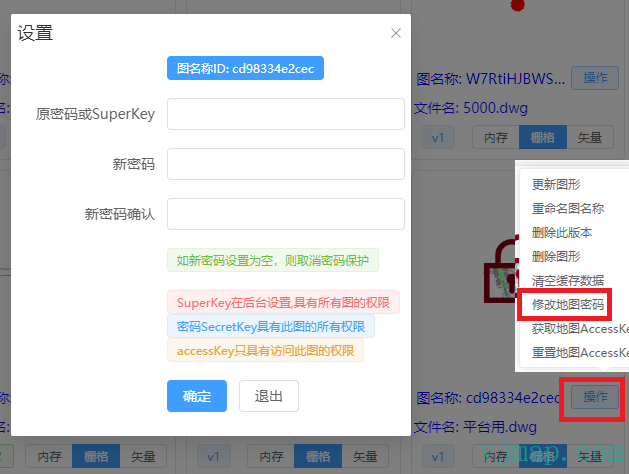
Go to the corresponding map's Operations menu in the VJMap Cloud Management Platform, then set Set Password to empty to remove the password.
# Hidden Maps
Maps whose mapid starts with ns_ are invisible in the cloud management platform. Only tokens with root permission can see them.
# Temporary Maps
Maps whose mapid starts with ns_temp_30 are temporary; 30 means auto-delete after 30 minutes. You can customize the duration.
/**
 * Get a temporary map id (temporary maps are for quick viewing and auto-delete when expired)
 * @param expireTime Auto-delete time in minutes when not browsed. Default 30
 * @param isVisible Whether visible (visible maps can be listed via ListMaps). Default invisible
 * @return
 */
export  function getTempMapId(expireTime?: number, isVisible?: boolean): string;
2
3
4
5
6
7