
# Entity Object Smart Recognition
# Overview
Entity Object Smart Recognition can intelligently recognize and match similar entity objects in CAD drawings. The system uses pattern matching algorithms, supports geometric transformations (scale, rotation), and provides rich configuration options and a visual interface.
The system provides two main recognition methods:
# 1. Block Reference Entity Recognition
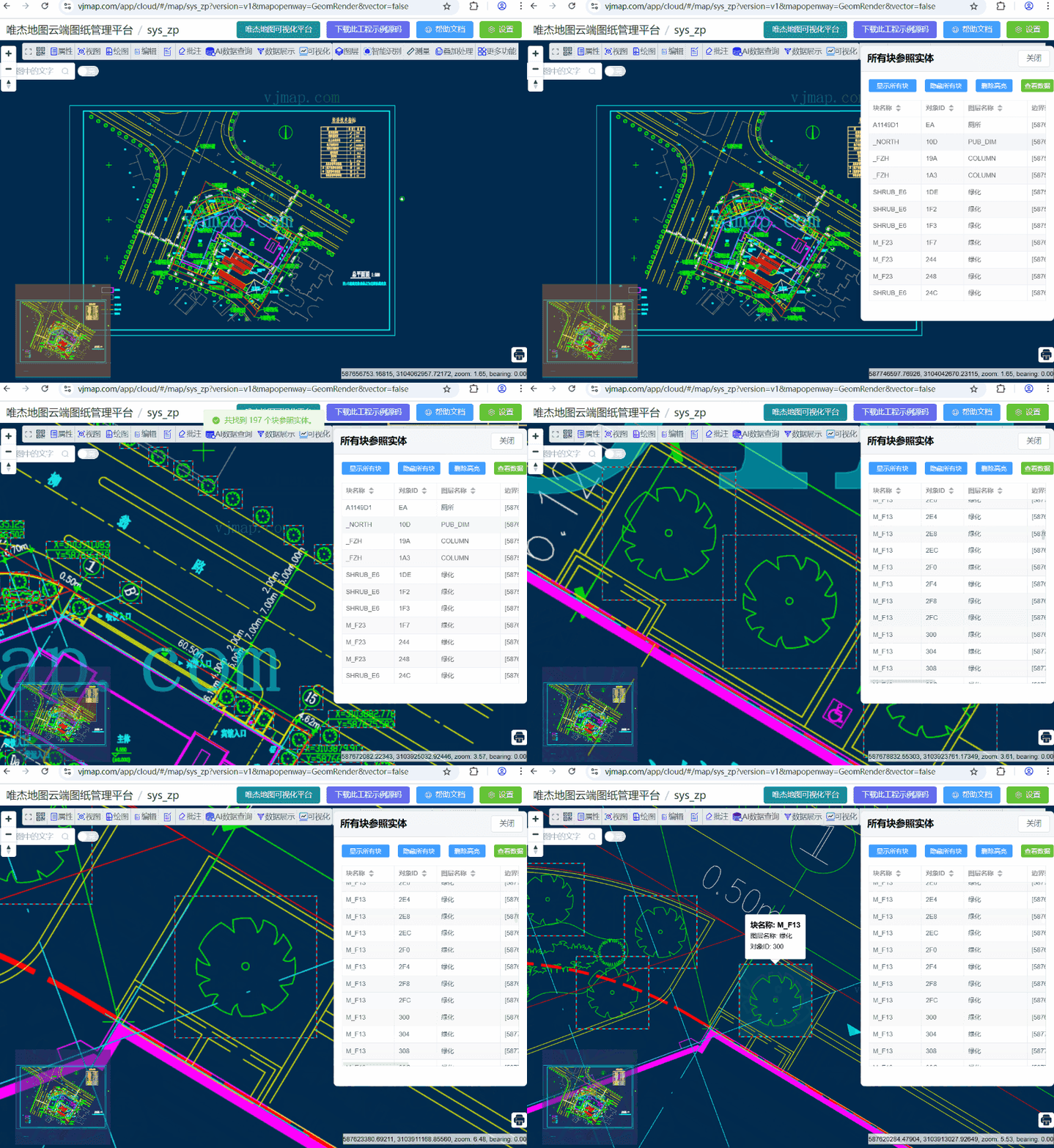
For objects that exist as blocks in CAD drawings, the system can:
- Batch retrieve all block references: Automatically retrieve all block reference entities in the drawing, supporting retrieval from metadata or expression queries
- Block information management: Display block name, object ID, layer name, boundary extent, position coordinates, rotation angle, scale factor, and other detailed information
- Visual display: Animate line frames and highlight all block positions and boundaries
- Interactive operations: Support clicking table rows to locate corresponding blocks, support show/hide visualization for all blocks
- Hover tooltips: Display detailed attribute information of blocks on mouse hover, including attribute data
# 2. Smart Object Recognition
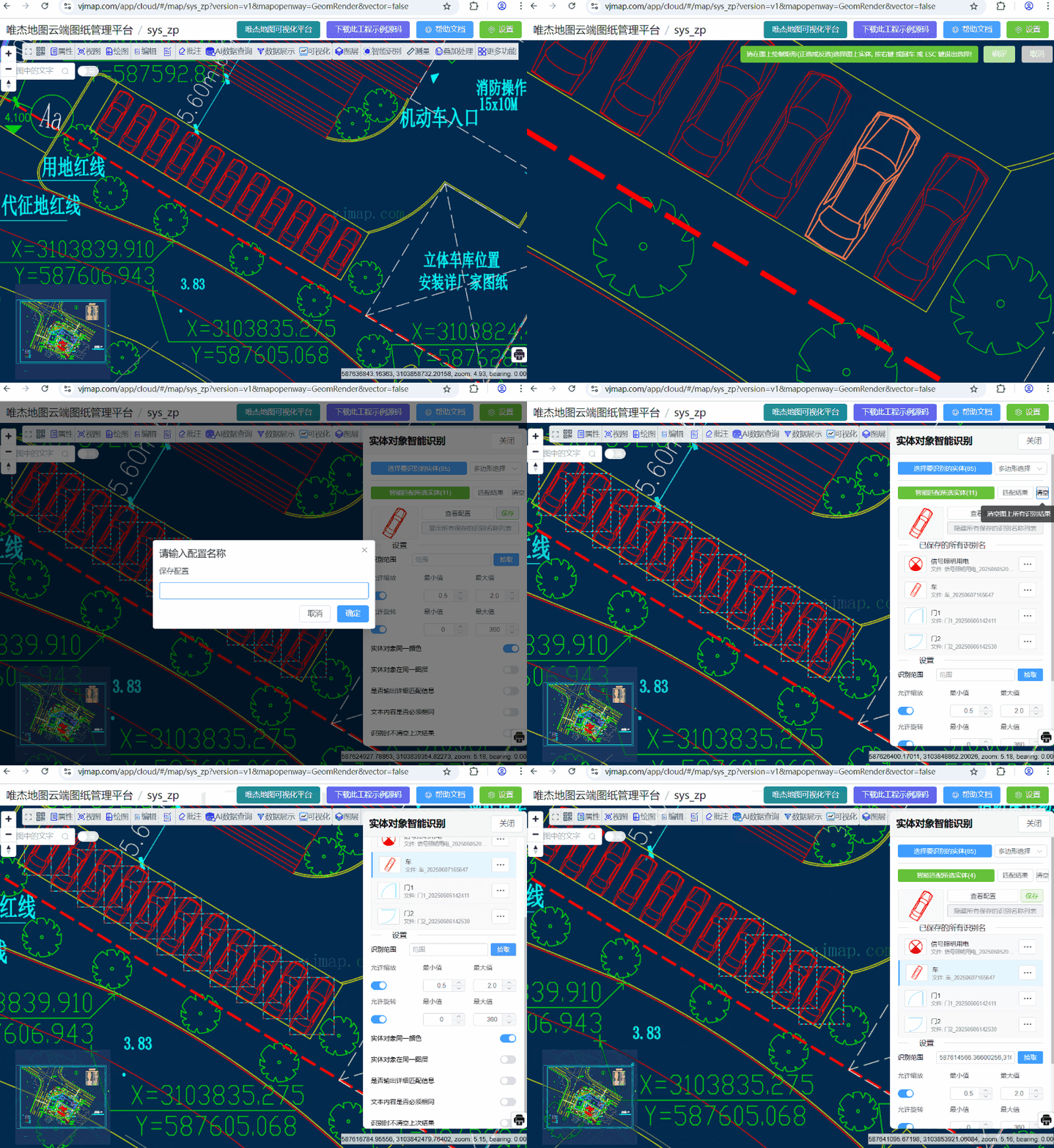
For ordinary CAD entity objects that are not in block form, the system provides:
- Pattern matching recognition: Intelligently match similar objects in the drawing based on user-selected reference entities
- Geometric transformation support: Support tolerance matching for scale, rotation, and other geometric transformations
- Multi-condition filtering: Support multiple matching conditions such as color, layer, text content
- Configuration management: Support saving and loading recognition configurations to improve recognition efficiency
# Core Features
# 1. Smart Entity Selection
- Multiple selection modes: Support box select, point select, and polygon select for entity selection
- Real-time preview: Display selected entity count immediately after selection
- Boundary calculation: Automatically calculate boundary extent of selected entities
# 2. Geometric Transformation Support
- Scale transformation: Support setting scale range (0.1-10x)
- Rotation transformation: Support setting rotation angle range (0-360 degrees)
- Transformation tolerance: Configurable tolerance for transformation matching
# 3. Matching Condition Configuration
- Color matching: Can set whether entities must have the same color
- Layer matching: Can set whether entities must be on the same layer
- Text content matching: Can set whether text entities must have the same content
- Custom matching rules: Support configuring matching properties for different entity types
# 4. Configuration Management System
- Configuration save: Support saving recognition configurations to server
- Configuration load: Support loading saved configurations from server
- Configuration overwrite: Support overwriting configurations with the same name
- Configuration delete: Support deleting unwanted configurations
# 5. Thumbnail Generation
- Auto generation: Automatically generate 120x80 pixel thumbnails after selecting entities
- Configuration association: Thumbnails saved with configuration for quick identification
- Real-time update: Automatically update thumbnail when selection changes
# Use Cases
# 1. Block Reference Entity Management
- Block entity statistics: Quickly count all block references and type distribution in drawings
- Block position location: Quickly locate specified block positions through table for viewing and editing
- Block attribute viewing: View detailed block attribute information including position, rotation angle, scale factor
- Block repetition analysis: Identify multiple instances of same block name, analyze design repetition
# 2. CAD Drawing Standardization Check
- Check consistency of similar elements in drawings
- Discover non-compliant design elements
# 3. Duplicate Element Detection
- Identify duplicate designs in drawings
- Optimize drawing storage and transmission
# 4. Design Pattern Analysis
- Analyze design patterns in drawings
- Extract reusable design elements
# 5. Smart Object Matching
- Intelligently match similar objects based on reference entities
- Support fuzzy matching with geometric transformations
- Improve automation of CAD drawing processing
# Technical Implementation Architecture
# 1. Core Data Structures
# Pattern Configuration Data
let patternConfig: any = {
  "name": "",
  "sameColor": true,
  "sameLayer": false,
  "global": {
    "match": {
      "all": {
        "equalMatchProperty": ["color"]
      },
      "AcDbCircle": {
        "scaleMatchProperty": ["radius"]
      },
      "AcDbArc": {
        "scaleMatchProperty": ["radius"]
      },
      "AcDbLine": {
        "scaleMatchProperty": ["length"]
      },
      "AcDbText": {
        "scaleMatchProperty": ["height"]
      }
    }
  },
  "rules": [{
    "tolerance": 0.00001,
    "translateTolerance": 0.015,
    "transform": {
      "scale": {
        "min": 0.5,
        "max": 2.0
      },
      "rotation": {
        "min": 0,
        "max": 360
      }
    },
    "referenceObjectIds": []
  }]
}
1
2
3
4
5
6
7
8
9
10
11
12
13
14
15
16
17
18
19
20
21
22
23
24
25
26
27
28
29
30
31
32
33
34
35
36
37
38
39
2
3
4
5
6
7
8
9
10
11
12
13
14
15
16
17
18
19
20
21
22
23
24
25
26
27
28
29
30
31
32
33
34
35
36
37
38
39
# 2. Key Algorithm Implementation
# Block Reference Entity Retrieval Algorithm
const detectAllBlockRefsObjects = async () => {
  try {
    removeAntPathAnimateLine();
    let svc = map.getService();
    let metadata = await svc.metadata();
    let blockReferences = []

    if("blockReferences" in metadata) {
      // Get block references from metadata (new version)
      let blockRefs = metadata.blockReferences;
      if (blockRefs) {
        blockReferences = JSON.parse(blockRefs);
      }
    } else {
      // Get block references via expression query (legacy)
      if (map.logInfo) map.logInfo("Fetching block data...", "success", 2000);
      let query = await svc.exprQueryFeature({
        expr: `gOutReturn := if((gInFeatureType == 'AcDbBlockReference'), 1, 0);`,
        fields: "", // all fields
        geom: false, // in-memory
        useCache: true,
        limit: 1000000 // all block refs
      });

      if (query.error) {
        ElMessage({
          type: 'error',
          message: query.error,
        });
        return;
      }

      blockReferences = query.result.map((r: any) => {
        return {
          objectId: r.objectid,
          blockName: r.blockname,
          layerName: r.layername,
          bounds: r.bounds,
          position: r.positon,
          ...r
        };
      });
    }

    // Save data and create visualization
    blockRefsData.value = blockReferences;
    let data = getData();
    createAntPathAnimateLine(data);
    createHighlightBlocks(data);

    ElMessage({
      type: 'success',
      message: `Found ${blockReferences.length} block reference(s).`,
    });
  } catch (error) {
    showError("Failed to get block references: " + (error as any).message);
  }
}
1
2
3
4
5
6
7
8
9
10
11
12
13
14
15
16
17
18
19
20
21
22
23
24
25
26
27
28
29
30
31
32
33
34
35
36
37
38
39
40
41
42
43
44
45
46
47
48
49
50
51
52
53
54
55
56
57
58
2
3
4
5
6
7
8
9
10
11
12
13
14
15
16
17
18
19
20
21
22
23
24
25
26
27
28
29
30
31
32
33
34
35
36
37
38
39
40
41
42
43
44
45
46
47
48
49
50
51
52
53
54
55
56
57
58
# Block Visualization Highlight Algorithm
const createHighlightBlocks = (data: any) => {
  let polygons = data
  let polygon = new vjmap.Polygon({
    data: polygons,
    fillColor: ['case', ['to-boolean', ['feature-state', 'hover']], '#0ff', '#f00'],
    // Transparent by default, highlight on hover
    fillOpacity: ['case', ['to-boolean', ['feature-state', 'hover']], 0.1, 0.0],
    fillOutlineColor: ['get', 'color'],
    isHoverPointer: true,
    isHoverFeatureState: true
  });

  polygon.addTo(map);
  // Hover popup
  polygon.hoverPopup((f: any, popup: any) => {
    let bounds = vjmap.GeoBounds.fromDataExtent(f);
    popup.setLngLat([bounds.center().x, bounds.max.y]);
    return `<h3>Block: ${f.properties.blockName}</h3>Layer: ${f.properties.layerName}<br>Object ID: ${f.properties.objectId}${f.properties.attributeDef ? '<br>Attributes: ' + f.properties.attributeDef : ''}`
  }, { anchor: 'bottom' });

  polygonOverlay = polygon;
}
1
2
3
4
5
6
7
8
9
10
11
12
13
14
15
16
17
18
19
20
21
22
2
3
4
5
6
7
8
9
10
11
12
13
14
15
16
17
18
19
20
21
22
# Entity Selection Algorithm
const select = async () => {
  removeAntPathAnimateLine()
  let result = await selectFeatures(map, null, btnCtx, false)
  if (!result || !result.features) return;
  currentFeatures.value = result.features
  patternConfig.rules[patternConfig.rules.length - 1].referenceObjectIds = result.features

  // Generate thumbnail after selection
  await generateThumbnail()
}
1
2
3
4
5
6
7
8
9
10
2
3
4
5
6
7
8
9
10
# Thumbnail Generation Algorithm
const generateThumbnail = async () => {
  if (currentFeatures.value.length === 0) {
    thumbnailImage.value = ''
    return
  }

  try {
    isGeneratingThumbnail.value = true

    // Bounds of all selected objects
    let allBounds = null
    for (const feature of currentFeatures.value) {
      const bounds = vjmap.GeoBounds.fromString(feature.properties.bounds)
      if (!allBounds) {
        allBounds = bounds
      } else {
        allBounds.updateByBounds(bounds)
      }
    }

    if (allBounds) {
      // Generate 120x80 thumbnail
      let objectIds = currentFeatures.value.map((item: any) => item.properties.objectid)
      const base64Image = await getObjectsThumbnail(map, objectIds, allBounds, 120, 80)
      thumbnailImage.value = base64Image
    }
  } catch (error) {
    console.error('Generate thumbnail failed:', error)
    thumbnailImage.value = ''
  } finally {
    isGeneratingThumbnail.value = false
  }
}
1
2
3
4
5
6
7
8
9
10
11
12
13
14
15
16
17
18
19
20
21
22
23
24
25
26
27
28
29
30
31
32
33
2
3
4
5
6
7
8
9
10
11
12
13
14
15
16
17
18
19
20
21
22
23
24
25
26
27
28
29
30
31
32
33
# Smart Recognition Algorithm
const detectAllObjects = async () => {
  try {
    if (!formData.value.keepLastResult) {
      removeAntPathAnimateLine();
    }
    if (currentFeatures.value.length == 0) {
      ElMessage({
        type: 'error',
        message: 'Please select entities to recognize first.',
      })
      return;
    }

    let svc = map.getService();
    ElMessage({
        type: 'success',
        message: 'Running recognition...',
    })

    // Call backend recognition service
    let res = await svc.execCommand("objectDetection", {
      mapid: svc.currentMapParam()?.mapid,
      version: svc.currentMapParam()?.version,
      layer: svc.currentMapParam()?.layer,
      pattern: JSON.stringify(patternConfig),
      detailedLog: formData.value.detailedLog,
      bounds: formData.value.bounds
    }, "_null", "v1");

    // Process recognition result
    if (res && res.result && res.result.length > 0) {
      // Show result on map
      let geoDatas = [];
      for (let i = 0; i < res.result.length; i++) {
        const bounds = vjmap.GeoBounds.fromString(res.result[i].bounds)
        const pts = bounds.toPointArray();
        pts.push(pts[0])

        geoDatas.push({
          points: map.toLngLat(pts.map(p => vjmap.geoPoint(p))),
          properties: {
            color: "#ff0000"
          }
        })
      }

      // Create animated line layer
      let antPathAnimateLine = vjmap.createAntPathAnimateLineLayer(map, geoDatas, {
        fillColor1: "#f00",
        fillColor2: formData.value.keepLastResult ? vjmap.randomColor() : "#0ff",
        canvasWidth: 128,
        canvasHeight: 32,
        frameCount: 4,
        lineWidth: 2,
        lineOpacity: 0.8
      });

      map._dectionAntPathAnimateLines = map._dectionAntPathAnimateLines || [];
      map._dectionAntPathAnimateLines.push(antPathAnimateLine);

      ElMessage({
        type: 'success',
        message: `Found ${geoDatas.length} matching object(s).`,
      })
    }
  } catch (error) {
    showError("Recognition failed: " + (error as any).message);
  }
}
1
2
3
4
5
6
7
8
9
10
11
12
13
14
15
16
17
18
19
20
21
22
23
24
25
26
27
28
29
30
31
32
33
34
35
36
37
38
39
40
41
42
43
44
45
46
47
48
49
50
51
52
53
54
55
56
57
58
59
60
61
62
63
64
65
66
67
68
69
2
3
4
5
6
7
8
9
10
11
12
13
14
15
16
17
18
19
20
21
22
23
24
25
26
27
28
29
30
31
32
33
34
35
36
37
38
39
40
41
42
43
44
45
46
47
48
49
50
51
52
53
54
55
56
57
58
59
60
61
62
63
64
65
66
67
68
69
# 4. Configuration Management Implementation
# Configuration Save
const saveConfig = async () => {
  try {
    // Load config list to check duplicate names
    if (configList.value.length === 0) {
      await loadConfigList()
    }

    const name = await getInput('Save config', 'Enter config name', patternConfig.name || '')
    if (!name || typeof name !== 'string') {
      ElMessage.warning('Config name cannot be empty')
      return
    }

    const exists = checkConfigExists(name)
    let shouldOverwrite = false

    if (exists) {
      try {
        const action = await ElMessageBox.confirm(
          `Config "${name}" already exists. Overwrite or add new?`,
          'Duplicate name',
          {
            confirmButtonText: 'Overwrite',
            cancelButtonText: 'Add new',
            distinguishCancelAndClose: true,
            type: 'warning'
          }
        )
        shouldOverwrite = true
        patternConfig.name = name
      } catch (error: any) {
        if (error === 'cancel') {
          patternConfig.name = name
        } else {
          return
        }
      }
    } else {
      patternConfig.name = name
    }

    // Delete existing config when overwriting
    if (shouldOverwrite) {
      const existingConfig = configList.value.find((c: any) => c.name === name)
      if (existingConfig) {
        const svc = map.getService()
        const deleteUrl = svc.serviceUrl(`recognizer/delete?filename=${existingConfig.filePrefix}`)
        await svc.httpDel(deleteUrl)
      }
    }

    // Add thumbnail to config
    if (thumbnailImage.value) {
      patternConfig.thumbnail = thumbnailImage.value
    }

    const svc = map.getService()
    const url = svc.serviceUrl("recognizer/add")
    const response = await svc.httpPost(url, patternConfig)
    const result = response.data
    if (result.code === 0) {
      ElMessage.success(shouldOverwrite ? 'Config overwritten' : 'Config saved')
      await loadConfigList()
    } else {
      ElMessage.error('Failed to save config')
    }
  } catch (error) {
    console.error('Save config failed:', error)
    ElMessage.error('Failed to save config')
  }
}
1
2
3
4
5
6
7
8
9
10
11
12
13
14
15
16
17
18
19
20
21
22
23
24
25
26
27
28
29
30
31
32
33
34
35
36
37
38
39
40
41
42
43
44
45
46
47
48
49
50
51
52
53
54
55
56
57
58
59
60
61
62
63
64
65
66
67
68
69
70
71
2
3
4
5
6
7
8
9
10
11
12
13
14
15
16
17
18
19
20
21
22
23
24
25
26
27
28
29
30
31
32
33
34
35
36
37
38
39
40
41
42
43
44
45
46
47
48
49
50
51
52
53
54
55
56
57
58
59
60
61
62
63
64
65
66
67
68
69
70
71
# Configuration Load
const selectConfig = async (config: any) => {
  try {
    selectedConfigId.value = config.filePrefix

    // Get config detail
    const svc = map.getService()
    const url = svc.serviceUrl(`recognizer/detail?filenames=${config.filePrefix}`)
    const response = await svc.httpGet(url)
    const result = response.data

    if (result.code === 0 && result.data && result.data.length > 0) {
      const configData = result.data[0]

      patternConfig = configData

      // Sync form data
      if (configData.rules && configData.rules.length > 0) {
        const rule = configData.rules[0]
        if (rule.transform) {
          if (rule.transform.scale) {
            formData.value.allowScale = true
            formData.value.scaleMin = rule.transform.scale.min || 0.5
            formData.value.scaleMax = rule.transform.scale.max || 2
          } else {
            formData.value.allowScale = false
          }

          if (rule.transform.rotation) {
            formData.value.allowRotation = true
            formData.value.rotationMin = rule.transform.rotation.min || 0
            formData.value.rotationMax = rule.transform.rotation.max || 360
          } else {
            formData.value.allowRotation = false
          }
        }
      }

      formData.value.sameColor = configData.sameColor || false
      formData.value.sameLayer = configData.sameLayer || false

      if (configData.thumbnail) {
        thumbnailImage.value = configData.thumbnail
      } else {
        thumbnailImage.value = ''
      }
      currentFeatures.value = patternConfig.rules[patternConfig.rules.length - 1].referenceObjectIds
      ElMessage.success(`Loaded config: ${config.name}`)
    }
  } catch (error) {
    console.error('Load config failed:', error)
    ElMessage.error('Failed to load config')
  }
}
1
2
3
4
5
6
7
8
9
10
11
12
13
14
15
16
17
18
19
20
21
22
23
24
25
26
27
28
29
30
31
32
33
34
35
36
37
38
39
40
41
42
43
44
45
46
47
48
49
50
51
52
53
2
3
4
5
6
7
8
9
10
11
12
13
14
15
16
17
18
19
20
21
22
23
24
25
26
27
28
29
30
31
32
33
34
35
36
37
38
39
40
41
42
43
44
45
46
47
48
49
50
51
52
53